If you’re in a hurry, you can find the complete source code on GitHub: https://github.com/dgkanatsios/TowerDefense and the second part of the tutorial is posted here: https://dgkanatsios.com/2014/09/06/a-tower-defense-game-in-unity-part-2-3/. In part 1, we will see how the game levels are saved/loaded from XML files and a mechanism we use to optimize our game, called object pooling. In part 2, we will visit the core tower defense game mechanics. You can also test the game in WebGL here.
Unless you’ve been living in a cave in the recent years, you surely must have played a Tower Defense style game. Be it Plants vs Zombies, Kingdom Rush, geoDefense, Jelly Defense or any other, I’m sure you’ve spent much quality time setting up your defenses, killing enemies and advancing stages. So, since it’s one of the most common game types you can find on the application stores out there, I decided to try my luck and create one from scratch, using Unity3D and present it in this tutorial. Since it’s a bit bigger compared to my previous efforts, it will be split in two parts. In this first post, we’ll describe the game, the level editor, the respective XML creation and parsing and the object pool used in the game to increase performance. Check the screenshot below to get a taste of how the game looks like, running on the Unity editor.

Scenario and gameplay are both pretty basic, actually. Badgers are attacking user’s bunny house and she has her Chuck Norris trained bunnies to protect it, by shooting arrows. In order to be able to create more protector bunnies, user needs carrot money. If user kills all the badgers after the predetermined number of rounds, she wins. If enough badgers get into the bunny house, user loses! Badgers follow a path in order to approach the house upon which protector bunnies cannot be placed.
Let’s dive a bit deeper into the game mechanics and gameplay.
– Bunny House: Initial life is 10, each badger that arrives If 10 badgers arrive at the house, game is over.
– Path: The path that the badgers will walk on in order to arrive at the house. Specific waypoints will designate their direction.
– Badger: Our enemy. It has a speed property and a health component, which is decreased when it is hit by an arrow. It follows waypoints (non-visible gameobjects) that are placed on the path pieces.
– Bunny: Our defense. It can shoot arrows at a constant fire rate. It starts its activity by looking for an enemy at a close vicinity. If it finds one, it starts shooting. If the enemy dies or leaves the vicinity, it searches for another enemy. Has a standard carrot cost to create.
– Carrot: Falling randomly from the top of the screen. User needs to tap/click on them in order to increase money, to create more bunnies.
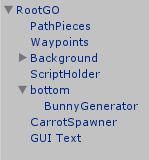
– BunnyGenerator: (yeah, I could have come up with a better name) It’s the bunny on the lower left part of the screen. User needs to drag it in order to create new bunnies. On areas that a new bunny cannot be created (such as on the path), it will highlight them as red. Upon a new bunny creation, a standard amount of money will be taken of the user’s account.
– Level Generator: All game levels are to be stored in an XML file that uses a standard format. The Unity developer has the option to use a custom made Unity editor that saves the file from the scene editor to an XML file.
We also have a couple of “roles” that will be mentioned in this tutorial
– Unity developer: The one that will use our custom editor to create new levels for the game
– User/gamer: The end user that will enjoy our game!Read More »
 Dimitris Gkanatsios